If you work in HR, MIS, accounts, operations, sales, support, management, or any office-based role, mastering the 20 Excel Formulas You MUST Know for Daily Office Work is not optional — it’s essential.
These 20 formulas are the backbone of Excel. They save hours, reduce errors, automate calculations, and help you create clean professional reports that impress your managers and clients.
Most employees only use 5–6 formulas and struggle with daily tasks. This article will fix that.
By the end, you’ll know the exact 20 formulas used in real offices every single day, with practical explanations and a free practice Excel file (all formulas included).
Let’s begin.
Table of Contents
⭐ Why These 20 Excel Formulas Are a Must for Daily Office Work
The reason these formulas matter is simple:
✔ 80% of daily Excel work uses these 20 formulas
From sales summaries to data cleaning, from HR attendance to MIS dashboards — these formulas appear everywhere.
✔ They reduce manual work and errors
Instead of typing values or doing calculator math, Excel does everything instantly.
✔ They make your reporting fast, clean, and professional
Managers love employees who work efficiently and present error-free reports.
✔ They are required in interviews
Most companies check these formulas during skill tests or Excel rounds.
This is why everyone—from beginner to expert—should master these 20 Excel Formulas You MUST Know for Daily Office Work.
📘 The 20 Excel Formulas You MUST Know for Daily Office Work (Explained Simply)
Below are the exact formulas used in your daily job — explained in the simplest, most practical way.
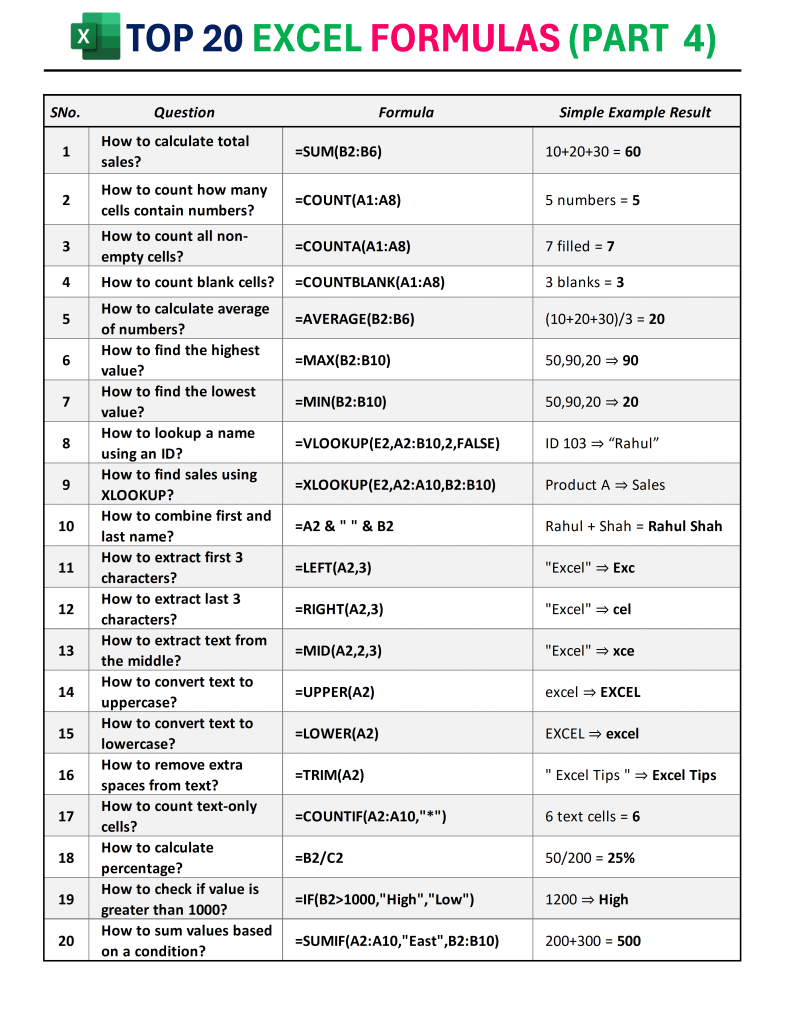
1. SUM — The Most Used Formula in Office Work
Formula:=SUM(B2:B11)
You’ll use SUM to calculate totals for:
✔ Sales
✔ Costs
✔ Hours worked
✔ Revenue
✔ Stock quantities
This formula alone can save you hours every week.
2. COUNT — Count Only Numbers
Formula: =COUNT(A2:A11)
Used for counting entries like:
✔ Number of transactions
✔ Number of numeric responses
✔ Number of working days
Essential in HR and accounting.
3. COUNTA — Count All Text + Numbers
Formula: =COUNTA(A2:A11)
Use it to count:
✔ Employee names
✔ Product names
✔ Filled responses
If the cell is not empty, COUNTA counts it.
4. COUNTBLANK — Find Missing Data
Formula: =COUNTBLANK(A2:A11)
In daily reporting, missing data can cause massive confusion.
This formula quickly highlights gaps.
5. AVERAGE — Find the Mean Value
Formula: =AVERAGE(B2:B11)
Used for:
✔ Employee performance score
✔ Average marks
✔ Monthly sales average
All managers love averages — they show performance in one number.
6. MAX — Highest Value
Formula: =MAX(B2:B11)
Perfect for identifying:
✔ Top performer
✔ Highest sale
✔ Highest expense
7. MIN — Lowest Value
Formula: =MIN(B2:B11)
Used for:
✔ Lowest salary
✔ Lowest performance
✔ Minimum cost
8. VLOOKUP — The Most Famous Excel Formula
Formula: =VLOOKUP(E2,A2:C11,3,FALSE)
Use it to retrieve:
✔ Salary by employee ID
✔ Price by product code
✔ Department by employee name
✔ Customer details
It searches vertically and returns matching data.
9. XLOOKUP — The Modern Replacement for VLOOKUP
Formula: =XLOOKUP(E2,A2:A11,B2:B11)
Benefits over VLOOKUP:
✔ No need for column number
✔ Can search left or right
✔ Works even if the table changes
Every modern Excel user MUST learn XLOOKUP.
10. CONCAT — Join Text Easily
Formula: =A2 & " " & B2
Used for:
✔ Joining first + last name
✔ Creating employee codes
✔ Merging text fields
11. LEFT — Extract First Few Characters
Formula: =LEFT(A2,3)
Used for:
✔ Department codes
✔ Product prefixes
✔ Category identification
12. RIGHT — Extract Last Characters
Formula: =RIGHT(A2,3)
Used for:
✔ Last digits of ID numbers
✔ Invoice codes
✔ Product suffixes
13. MID — Extract From the Middle
Formula: =MID(A2,2,3)
Used for:
✔ Cleaning imported data
✔ Extracting sequence from mixed codes
14. UPPER — Convert to Capital Letters
Formula: =UPPER(A2)
Used to standardize names when data is inconsistent.
15. LOWER — Convert to Small Letters
Formula: =LOWER(A2)
Helpful for email lists and cleaning inconsistent entries.
16. TRIM — Remove Extra Spaces
Formula: =TRIM(A2)
One of the most important formulas for data cleaning.
It removes:
✔ Double spaces
✔ Leading spaces
✔ Trailing spaces
17. COUNTIF — Count Based on a Condition
Formula: =COUNTIF(A2:A11,"*")
Used for:
✔ Counting “Completed” tasks
✔ Counting “Pending” labels
✔ Counting specific names or categories
18. Percentage Formula
Formula: =B2/C2
Used for:
✔ Achievement %
✔ Growth %
✔ Marks percentage
✔ Discount rates
19. IF — Logical Test Formula
Formula: =IF(B2>1000,"High","Low")
Used for classification:
✔ High/Low
✔ Pass/Fail
✔ Approved/Rejected
20. SUMIF — Conditional Total
Formula: =SUMIF(A2:A11,"East",B2:B11)
Used for region-wise summaries:
✔ East sales
✔ North expenses
✔ Category totals
🚀 How Mastering These 20 Excel Formulas Changes Your Daily Work
Once you master these 20 Excel Formulas You MUST Know for Daily Office Work, you’ll be able to:
✔ Prepare clean reports in minutes
✔ Clean messy data instantly
✔ Lookup any information quickly
✔ Automate calculations
✔ Make dashboards faster
✔ Reduce dependence on others
✔ Impress seniors with accuracy and speed
Most people struggle with Excel because they never learn these essential formulas.
But YOU now have the advantage.
📥 Download the Excel Practice File (All 20 Datasets Included)
Click below to download the full practice workbook with all 20 dataset tables:
👉 Excel File:
Download Practice FileUse this file to practice each formula in real scenarios.
FAQs : 20 Excel Formulas You MUST Know for Daily Office Work
Are these truly the 20 Excel formulas I need for daily office work?
Yes — these are the formulas used in HR, MIS, Finance, Sales, Operations, and reporting roles every single day.
How long will it take to learn all 20 formulas?
If you practice daily using the downloadable file, you can master them in 2–3 days.
Do I need Excel 365 for these formulas?
All formulas except XLOOKUP work in any Excel version.
XLOOKUP requires Excel 2021 or Microsoft 365.
Is VLOOKUP still needed if I learn XLOOKUP?
Yes, because many companies still use old Excel sheets that rely on VLOOKUP.
Can I use this article for teaching or training?
Absolutely — it’s structured for trainers, students, corporates, and Excel learners.
🎯 Final Words
Mastering the 20 Excel Formulas You MUST Know for Daily Office Work is the fastest way to upgrade your professional value. These formulas help you work smarter, faster, and more accurately — qualities every company needs.
You now have:
✔ The full 20-formula guide
✔ Clear explanations
✔ Real-world usage
✔ A downloadable Excel practice workbook
Start practicing today — your Excel confidence will instantly grow.
Excel Shortcuts
20 Excel Formulas You MUST Know for Daily Office Work
Also Read : Pivot Shortcut in Excel
