
Table of Contents
Introduction
QR Codes have become an essential part of modern business workflows — from invoices, payment links, attendance systems, inventory labels, to WhatsApp and website links.
If you are an Excel user, the good news is:
👉 You can generate QR Code in Excel using VBA automatically, without installing any add-ins or third-party software.
In this guide, you will learn how to generate QR Code in Excel using VBA, where you simply paste a link into a cell, click a button, and Excel instantly creates a QR code image.
This method is simple, fast, free, and perfect for automation.
Why Generate QR Code in Excel Using VBA?
Using VBA to generate QR codes in Excel gives you several advantages:
- No external software required
- Works with normal Excel files
- Perfect for bulk automation
- Ideal for invoices, tracking systems, and reports
- Fully customizable
Instead of manually creating QR codes online, Excel does it for you automatically.
How This Excel VBA QR Code Generator Works
This solution uses a free QR Code API that converts any text or URL into a QR image.
Workflow:
- Paste your link or text in a cell
- Click a button
- VBA fetches the QR image
- QR Code is placed inside Excel automatically
This makes it one of the best ways to generate QR Code in Excel using VBA.
Sheet Setup (Before VBA)
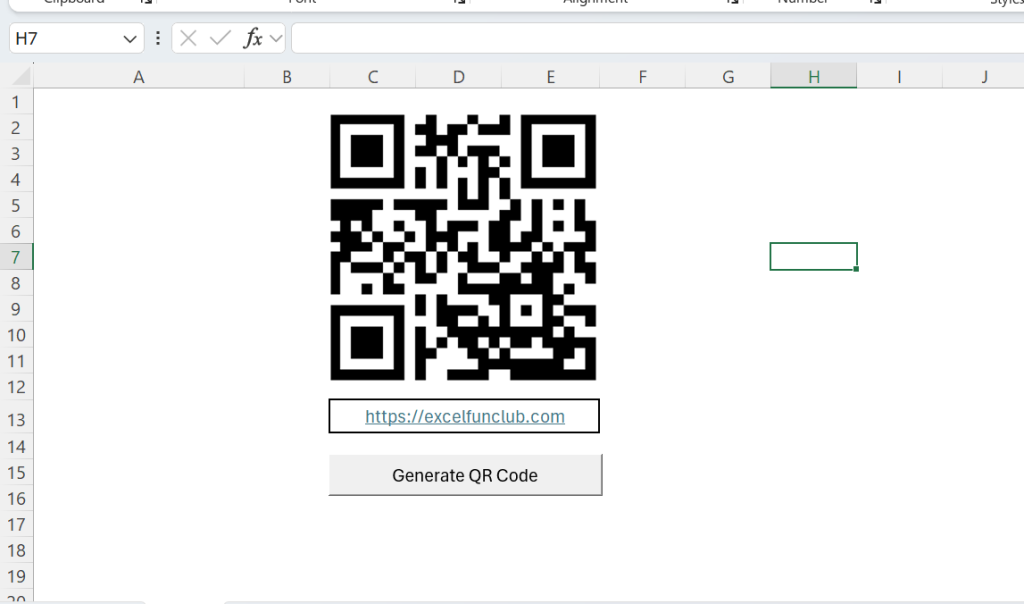
- Input Cell:
C13→ Paste your URL or text - QR Output Position: Near
C2 - Button: “Generate QR Code”
Example input:
https://www.excelfunclub.com
VBA Code to Generate QR Code in Excel
Below is the complete VBA macro to generate QR Code in Excel using VBA:
Sub Generate_QR_Code()

    Dim QRText As String
    Dim QRUrl As String
    Dim QRShape As Shape

    ' Cell where link/text is entered
    QRText = Sheets("Sheet1").Range("C13").Value

    If QRText = "" Then
        MsgBox "Please enter a link or text in cell C13", vbExclamation
        Exit Sub
    End If

    ' QR Code API URL
    QRUrl = "https://api.qrserver.com/v1/create-qr-code/?size=200x200&data=" & QRText

    ' Delete old QR Code if exists
    For Each QRShape In Sheets("Sheet1").Shapes
        If QRShape.Name = "QRCode" Then QRShape.Delete
    Next QRShape

    ' Insert QR Code image
    Sheets("Sheet1").Pictures.Insert(QRUrl).Select
    Selection.Name = "QRCode"

    ' Position QR Code
    With Selection
        .Top = Sheets("Sheet1").Range("C2").Top
        .Left = Sheets("Sheet1").Range("C2").Left
        .Width = 150
        .Height = 150
    End With

End Sub
How to Add the Button in Excel
To trigger the QR code generation:
- Go to Developer Tab
- Click Insert → Button (Form Control)
- Draw the button
- Assign macro →
Generate_QR_Code - Rename button text to Generate QR Code
Now, every click will instantly create a QR Code.
Customization Options
You can easily customize this VBA QR code generator.
Change QR Size
Modify:
size=200x200
Example:
size=300x300
Change Input Cell
Replace:
Range("C13")
with any other cell reference.
Change QR Placement
Modify:
Range("C2")
to position the QR anywhere in your sheet.
Practical Use Cases
This method to generate QR Code in Excel using VBA is perfect for:
- Invoice QR codes (payment links)
- Attendance systems
- Product labels
- Website & WhatsApp links
- Google Form links
- Employee ID cards
- Inventory tracking
SEO & Performance Benefits
Unlike add-ins, this VBA approach:
- Keeps file size small
- Works offline after load
- Is fully controlled by Excel
- Can be shared easily
This makes it ideal for corporate and professional Excel automation.
Free Excel QR Code Template Download
To save your time, we have created a ready-to-use Excel QR Code Generator Template.
What you get:
- Pre-configured VBA macro
- Button already added
- Clean layout
- Editable cells
- Beginner-friendly
👉 Download the Generate QR Code in Excel using VBA Template
Final Words
If you want a clean, automated, and professional way to generate QR Code in Excel using VBA, this solution is perfect for you.
It saves time, avoids manual work, and integrates beautifully with existing Excel workflows.
📌 Follow ExcelFunClub for more Excel tricks
📌 Share this guide with your team
FAQs : Generate QR Code in Excel using VBA
Can Excel generate QR Code using VBA?
Yes. You can generate QR Code in Excel using VBA by fetching a QR image from a free API and inserting it automatically into the worksheet.
Is this Excel QR Code method free?
Yes. The API used in this VBA macro is completely free and does not require login or API keys.
Can I generate QR codes for multiple rows?
Yes. The macro can be modified to loop through multiple cells and generate bulk QR codes.
Does this work in all Excel versions?
This works in Excel 2016, 2019, Excel 2021, and Microsoft 365.
Can I save the QR code as an image file?
Yes. With a small VBA extension, the QR code can be exported as PNG or JPG.
Is internet required?
Yes, only while generating the QR code. Once generated, the image stays in Excel.
Also read: Create Barcodes in Excel (Instant Barcode Generator Trick!)
Microsoft VBA Documentation
https://learn.microsoft.com/en-us/office/vba/api/overview/excel
